
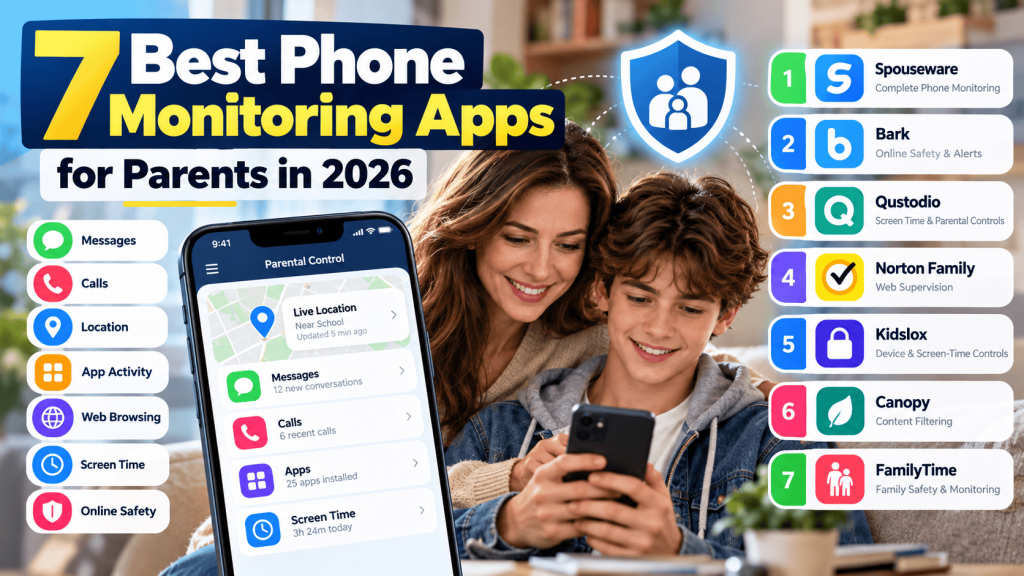
Giving a child their first smartphone can be exciting, but it also introduces a new set of responsibilities for parents.
Today’s smartphones aren’t simply devices for making calls. Children can use them to browse the web, watch videos, communicate through messaging apps, use social media, play games, share photos, and interact with people around the world.
Before comparing individual tools, it helps to understand how phone monitoring apps work, including how device permissions, data collection, synchronization, and online dashboards function.
Most of those activities can be perfectly normal. At the same time, parents may have legitimate concerns about excessive screen time, cyberbullying, inappropriate websites, unknown contacts, scams, privacy, or unsafe online behavior.
That’s where the best phone monitoring apps for parents can help.
Modern parental monitoring tools offer much more than basic screen-time limits. Depending on the app and device, parents may have access to location information, app controls, web filtering, activity reports, communication-management features, safety alerts, and other parental controls.
But which one should you choose?
We’ve compared seven phone monitoring and parental-control platforms worth considering in 2026: Spouseware, Bark, Qustodio, Norton Family, Kidslox, Canopy, and FamilyTime.
Before choosing any monitoring solution, remember that parental controls work best when they’re combined with clear family rules and age-appropriate conversations about online safety.
Important: Use monitoring software only on devices you own or are legally authorized to manage. Privacy and monitoring laws vary by location. Parents should consider age-appropriate transparency and explain family technology rules whenever appropriate.
Why Are Phone Monitoring Apps Important for Parents?
Children are spending more of their lives online.
Homework, entertainment, friendships, gaming, videos, and social interactions can all happen through a smartphone.
That connectivity provides enormous benefits, but it can also expose children to risks.
Parents may be concerned about issues such as:
- Cyberbullying
- Excessive screen time
- Inappropriate websites
- Unknown online contacts
- Online scams
- Social-media pressure
- Privacy risks
- Location safety
- Inappropriate applications
- Harmful online interactions
A parental monitoring app cannot eliminate every digital risk.
Instead, think of it as another tool in your family’s online-safety strategy.
The right solution can help parents establish boundaries, identify potential concerns, and understand how a child’s device is being used.
What Should You Look for in a Phone Monitoring App?
Before comparing products, determine what you actually need.
Some parents primarily want to manage screen time.
Others want location information.
Some families are more concerned about inappropriate web content, while others want greater visibility into smartphone activity.
When comparing the best phone monitoring apps for parents, consider several important factors.
Device Compatibility
Check whether the service supports Android, iPhone, or both.
Don’t assume that the same features are available on every operating system. Android and iOS have different security restrictions and parental-control capabilities.
Parental Control Features
Look for features that address your actual concerns, such as:
- Screen-time controls
- App management
- Website filtering
- Location information
- Communication controls
- Activity reports
- Safety alerts
More features aren’t automatically better.
The best application is the one that provides the controls your family will actually use.
Privacy and Security
Parental monitoring services can process sensitive information.
Review the provider’s privacy policy, account-security options, data-handling practices, and deletion procedures before subscribing.
Ease of Use
Parents shouldn’t need advanced technical knowledge just to understand what’s happening on a child’s phone.
Look for an organized dashboard, understandable reports, and clear settings.
Pricing
Compare the total cost rather than only the promotional monthly price.
Some services charge per device, while others offer family plans covering multiple devices.
With those considerations in mind, let’s examine seven options.
1. Spouseware — Broad Phone Activity Monitoring
Spouseware provides phone-monitoring capabilities designed to give authorized users greater visibility into smartphone activity through a centralized dashboard.
For parents who want more than basic screen-time controls, a broader monitoring platform can provide additional context about how a device is being used.
Depending on device compatibility and configuration, Spouseware provides monitoring capabilities across multiple areas of smartphone activity.
Spouseware Features
Parents evaluating Spouseware can explore features related to:
- Message activity
- Call activity
- GPS location information
- Contacts
- Browser activity
- Application activity
- Photos and media
- Device activity
- Alerts
- Monitoring dashboard
Having multiple types of activity available through one platform can make it easier for parents to understand general patterns without relying on several separate applications.
Why Parents May Consider Spouseware
Context is one of the biggest advantages of broader parental monitoring.
For example, screen-time information can tell you that a child spent several hours on their phone, but it may not explain what they were doing during that time.
A wider activity overview may help parents recognize when a conversation or change in family technology rules is appropriate.
Spouseware may therefore be worth considering for families looking for a broader phone-monitoring solution rather than only a basic screen-time application.
Parents should still use these capabilities responsibly and adjust supervision as children become more independent.
2. Bark — Online Safety and Alerts
Bark takes a different approach to parental monitoring.
Instead of making constant manual review the center of the experience, Bark focuses heavily on detecting potentially concerning online activity and notifying parents.
This can appeal to families that want to give children some independence while still having technology available to flag potential problems.
Bark Features to Evaluate
Depending on the service, plan, and supported device, parents can investigate features involving:
- Content monitoring
- Safety alerts
- Screen-time management
- Website controls
- App management
- Location features
Bark’s alert-focused approach may be particularly useful for parents concerned about online safety but who don’t want to manually review every activity.
Who Might Consider Bark?
Bark may suit families whose main concerns involve potentially harmful online interactions, inappropriate content, or unhealthy digital habits.
As always, check current Android and iPhone feature availability before subscribing.
3. Qustodio — Screen Time and Parental Controls
Qustodio is one of the established names in the parental-control market.
Its platform emphasizes helping parents understand and manage how children use their devices.
For families struggling with excessive smartphone use, the ability to establish clear digital boundaries can be particularly useful.
Qustodio Features to Evaluate
Depending on device and subscription, parents can investigate tools related to:
- Screen-time limits
- App management
- Web filtering
- Activity reporting
- Location features
- Communication-related controls
- Family device management
Why Parents May Consider Qustodio
Qustodio may appeal to parents who prioritize conventional parental controls.
Rather than concentrating exclusively on detailed phone activity, its broader digital-wellness approach can help families establish rules around when and how devices are used.
This can be useful for younger children receiving their first smartphone or families trying to establish healthier screen habits.
4. Norton Family — Web Supervision and Healthy Online Habits
Norton is widely known for cybersecurity products, and Norton Family extends the brand into parental controls.
The service focuses heavily on helping parents supervise children’s online activity and establish healthier technology habits.
Norton Family Features to Evaluate
Parents may want to investigate capabilities involving:
- Web supervision
- Search supervision
- Time management
- Location-related features
- School-time controls
- Activity information
One interesting aspect is its emphasis on helping children stay focused during designated school periods.
That can be useful for families where the same device is used for both education and entertainment.
Who Might Consider Norton Family?
Norton Family may be suitable for parents whose biggest concerns are web browsing, distractions, and general online habits rather than highly detailed smartphone monitoring.
Before subscribing, confirm that the features you need are available for your child’s specific device.
5. Kidslox — Screen-Time and Device Controls
Kidslox is another parental-control platform designed to help families manage children’s smartphone and tablet usage.
Screen-time management is an important part of digital parenting because unrestricted device use can interfere with sleep, homework, family activities, and offline interests.
Kidslox Features to Evaluate
Depending on plan and device support, parents can investigate tools involving:
- Screen-time management
- App controls
- Device restrictions
- Content-related controls
- Location features
- Family device management
Why Parents May Consider Kidslox
Kidslox may appeal to families primarily trying to establish healthier smartphone routines.
For example, parents might want devices unavailable during homework, meals, bedtime, or family activities.
Scheduled restrictions can make those rules more consistent.
Instead of repeatedly telling a child to put their phone away, families can establish agreed-upon digital schedules.
Technology shouldn’t replace family rules, but it can help enforce rules consistently.
6. Canopy — Content Filtering and Online Protection
Canopy differentiates itself by focusing heavily on content filtering and online protection.
For some families, inappropriate online content is a bigger concern than screen time or detailed phone activity.
In that situation, choosing a specialized filtering solution may make more sense than purchasing the application with the longest monitoring-feature list.
Canopy Features to Evaluate
Parents researching Canopy can investigate features involving:
- Content filtering
- Website management
- Online safety
- App-related controls
- Family device protection
Who Might Consider Canopy?
Canopy may be worth investigating for families whose primary objective is preventing children from encountering inappropriate online content.
This highlights an important lesson when comparing parental monitoring apps:
Choose based on the problem you’re trying to solve.
A specialized content-filtering platform might be a better choice for one family, while another family may need screen-time controls, location information, or broader phone activity monitoring.
7. FamilyTime — Family Safety and Parental Controls
FamilyTime combines parental-control functionality with family-safety features.
This makes it another option for parents who want tools covering both digital activity and everyday family routines.
FamilyTime Features to Evaluate
Depending on device and plan, parents can investigate capabilities related to:
- Screen-time controls
- App management
- Location information
- Family safety
- Communication-related controls
- Activity monitoring
Who Might Consider FamilyTime?
FamilyTime may appeal to households looking for a combination of traditional parental controls and location-oriented family features.
As with every service in this comparison, review its latest feature and compatibility information before making a purchasing decision.
Phone Monitoring Apps Comparison
Here’s a simple way to think about the seven platforms:
| App | Main Area to Evaluate | May Suit Parents Looking For |
|---|---|---|
| Spouseware | Broad phone activity | Multiple monitoring capabilities in one dashboard |
| Bark | Safety alerts | Automated identification of potential online concerns |
| Qustodio | Parental controls | Screen time, web controls, and digital boundaries |
| Norton Family | Web supervision | Online habits and school-time management |
| Kidslox | Device controls | Screen-time schedules and device restrictions |
| Canopy | Content filtering | Protection from inappropriate online content |
| FamilyTime | Family controls | Parental controls combined with family-safety features |
Features and availability can change. Always check each provider’s current documentation before purchasing.
Android vs. iPhone: Does It Matter?
Yes.
This is one of the most important considerations when choosing a parental monitoring application.
Android and iOS are fundamentally different platforms.
Apple places significant restrictions around what applications can access on an iPhone. Android also has security protections, but available parental-control capabilities can differ.
As a result, a feature advertised by a provider may work differently depending on:
- Operating system
- OS version
- Device manufacturer
- Required permissions
- Account configuration
- Subscription level
Never purchase a monitoring application based only on a general feature list.
Check the provider’s compatibility page for the exact device you intend to manage.
How Much Phone Monitoring Is Appropriate?
There’s no universal answer.
A seven-year-old using their first tablet may need different controls from a seventeen-year-old preparing for college.
Parental supervision should evolve as children mature.
Younger children may benefit from stronger restrictions involving apps, websites, screen time, and communication.
As children demonstrate responsible behavior, parents can gradually reduce restrictions and give them more independence.
The long-term goal shouldn’t be permanent monitoring.
It should be helping children develop the knowledge and judgment required to navigate the internet safely on their own.
Talk to Your Child About Online Safety
Even the best phone monitoring apps for parents cannot replace communication.
Parents should regularly discuss topics such as:
- Cyberbullying
- Online strangers
- Password security
- Privacy
- Scams
- Social-media behavior
- Inappropriate content
- Location sharing
- Personal information
Make sure children understand that asking for help won’t automatically result in losing their smartphone.
If children believe they’ll immediately be punished whenever they report an uncomfortable online interaction, they may become less likely to tell their parents about problems.
Create an environment where online safety can be discussed openly.
Can Phone Monitoring Help With Cyberbullying?
Parental controls can sometimes help families identify concerning online activity, but no application can completely prevent cyberbullying.
Parents should teach children how to respond when something happens.
That can include not engaging with abusive messages, saving appropriate evidence, blocking accounts, using platform reporting systems, and speaking with a trusted adult.
Schools may also need to become involved when bullying involves classmates.
Technology can help parents identify potential warning signs, but emotional support and communication remain essential.
Privacy and Responsible Monitoring
A child’s safety matters, but so does their developing sense of privacy.
Parents should think carefully about what information they genuinely need.
Collecting more information isn’t automatically better parenting.
For many families, the best approach involves:
- Establishing clear technology rules.
- Explaining why parental controls are being used.
- Using only the controls necessary for the child’s age and circumstances.
- Reviewing those controls periodically.
- Reducing monitoring as the child demonstrates responsibility.
Parents should also review applicable privacy and monitoring laws.
Never install monitoring software on a device you don’t own or aren’t legally authorized to manage.
Trusted Resources for Parents
Phone monitoring tools can support digital safety, but technology works best when parents also understand the online risks children may face. For additional guidance, parents can review StopBullying.gov’s Cyberbullying Guidance for information about recognizing and responding to cyberbullying.
Parents can also explore the FTC’s Protecting Kids Online Guidance for practical information about helping children make safer choices online, protecting their privacy, and discussing responsible internet use.
Frequently Asked Questions
What are the best phone monitoring apps for parents?
There isn’t one solution that’s best for every family. Spouseware, Bark, Qustodio, Norton Family, Kidslox, Canopy, and FamilyTime provide different approaches to parental monitoring. Compare their current compatibility, privacy practices, features, and pricing against your family’s needs.
What should parents look for in a phone monitoring app?
Start with device compatibility, then consider the specific features you need. These might include screen-time management, location information, web filtering, app controls, communication-related features, safety alerts, or broader phone activity monitoring.
Can I monitor my child’s Android phone?
Many parental-control applications support Android. Exact functionality depends on the Android version, manufacturer, permissions, and application.
Can parental monitoring apps work on iPhone?
Yes, many parental-control services support iPhones. However, available functionality can differ from Android because of Apple’s security restrictions. Always check current compatibility before subscribing.
Are parental monitoring apps safe?
Safety depends on the provider and how the service handles information. Review privacy policies, security practices, account protection, data retention, and deletion options before using any monitoring service.
Can phone monitoring apps stop cyberbullying?
No application can guarantee that cyberbullying won’t occur. Parental controls can form one part of a broader safety strategy involving communication, education, privacy controls, blocking tools, and platform reporting.
Should parents tell children they’re using parental controls?
Age-appropriate transparency can help children understand why digital rules exist. Family conversations about online safety can also help children develop independent judgment as they grow older.
Final Thoughts: Choosing the Right Phone Monitoring App
The best phone monitoring apps for parents aren’t necessarily the ones offering the most features.
They’re the ones that address the specific concerns your family faces.
If you want broader visibility into phone activity, you might investigate a platform such as Spouseware.
If automated online-safety alerts are your priority, Bark takes a different approach.
If your main concern is screen time and digital boundaries, Qustodio, Norton Family, or Kidslox may deserve closer consideration.
And families particularly concerned about inappropriate web content may want to investigate specialized filtering tools such as Canopy.
Whatever you choose, remember that monitoring software is only a tool.
5 Best Apps to Monitor Text Messages for Parents in 2026
Signs of Cheating: 25 Red Flags Your Partner May Be Unfaithful
How to Track Your Wife’s Phone Location Discreetly