
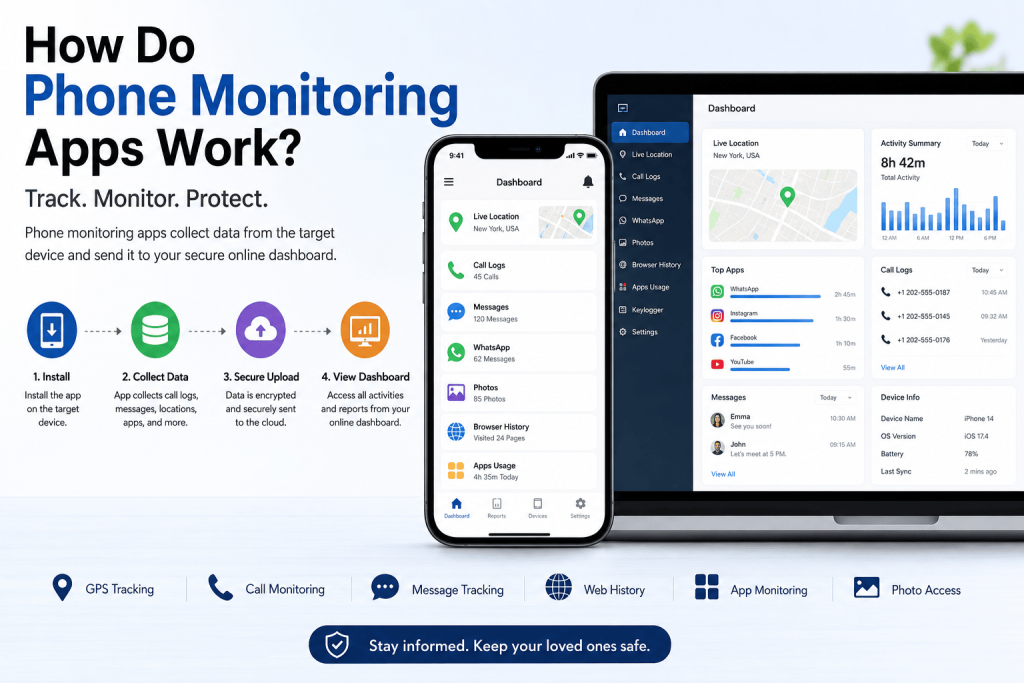
Phone monitoring technology can seem complicated at first. You install software on a device, and information such as location, screen time, app activity, or device usage becomes available through a dashboard. But how do phone monitoring apps work, and what actually happens behind the scenes?
In simple terms, phone monitoring apps use permissions provided by the operating system to collect authorized device information. Depending on the software, that information may then be securely synchronized with a remote server and organized inside an online dashboard.
The exact capabilities vary considerably between Android and iPhone, and modern operating systems place restrictions on access to sensitive information.
For parents, monitoring tools can provide additional context about how a child’s device is being used. Businesses may also use device-management software on company-owned smartphones, while individuals may use similar technology to manage their own devices.
This guide explains how phone monitoring apps work, what information they may access, the differences between Android and iPhone, and what to consider before choosing a monitoring solution.
Important: Monitoring software should only be used on devices you own or are legally authorized to manage. Privacy and consent requirements vary by location and situation.
What Is a Phone Monitoring App?
A phone monitoring app is software designed to collect selected information about a smartphone or tablet and organize that information for an authorized user.
Depending on the operating system, software, configuration, and permissions granted, a monitoring application may provide access to information such as:
- GPS location
- Call history
- SMS activity
- Screen time
- App usage
- Browser activity
- Contacts
- Calendar information
- Photos or media
- Device information
- Battery information
- Security or activity alerts
Not every monitoring application provides all these features.
Android and iPhone also have different security architectures and permission systems. A feature available on one platform may therefore be unavailable or more restricted on another.
How Do Phone Monitoring Apps Work?
Most phone monitoring applications can be understood through four basic stages:
Installation and permissions → Data collection → Secure synchronization → Dashboard reporting
Let’s look at each stage.
1. Installation and Permissions
First, the monitoring solution must be configured for the device or account being managed.
Depending on the platform and product, this can involve installing an application and granting specific permissions.
Examples include permission to access:
- Location
- Contacts
- Notifications
- Photos
- Device activity
- Usage information
Modern Android and iOS devices use permission systems to control what applications can access.
This is important because installing an application does not automatically give it unrestricted access to everything stored on a phone.
The permissions granted to the application, the operating system version, and the device’s security settings determine what information can be accessed.
2. Data Collection
After configuration, the application can collect the categories of information it is authorized to access.
For example, if location permission is enabled, an application may record location information.
If device-usage information is available, the software may generate reports showing how much time is spent using different applications.
Depending on the monitoring solution, collected information might include:
- Location history
- Device activity
- App usage
- Screen time
- Call records
- Browser activity
- Battery status
- Installed applications
Operating-system restrictions remain important here.
Both Google and Apple continually update their security and privacy controls, which means monitoring capabilities can change as Android and iOS evolve.
3. Secure Data Synchronization
Collecting information on the phone is only part of the process.
For remote reporting, supported information usually needs to be synchronized with the provider’s servers.
This typically occurs when the device has an internet connection through Wi-Fi or mobile data.
A properly designed service should use appropriate security protections when transferring sensitive information.
Depending on the product, information may be synchronized periodically rather than appearing instantly.
Connection quality, device settings, battery optimization, operating-system restrictions, and server availability can all affect synchronization.
4. Dashboard and Reporting
The final stage is presenting the information in a way that is understandable.
Instead of displaying raw technical records, monitoring services typically organize information through a dashboard.
A dashboard might contain:
- Recent device activity
- Location information
- App usage
- Screen-time reports
- Call activity
- Browser activity
- Device status
- Alerts and notifications
This is what makes monitoring platforms useful for ordinary users. You don’t need to interpret large amounts of raw device information manually because the platform organizes available data into categories and reports.
What Information Can Phone Monitoring Apps Access?
The answer depends heavily on the particular application and device.
A monitoring solution may support some combination of the following.
Location Information
With appropriate location permissions, an application may provide current or historical location information.
Some family-safety applications also support geofencing, which can provide notifications related to predefined locations.
Call Activity
Some platforms can display information related to phone calls, depending on operating-system restrictions and permissions.
This might include details such as call times and duration.
Messaging Activity
Messaging access varies significantly between platforms and applications.
Modern operating systems protect private communications, so you should never assume that every monitoring product can access every messaging application.
Parents particularly interested in this area can read our guide to the best apps to monitor text messages for parents.
App Usage
App-usage reports can help show which applications receive the most attention.
For parents, this can be useful when discussing healthy technology habits and screen-time boundaries.
Screen Time
Screen-time information can help identify how long a device or particular application is being used.
This is one of the most common features found in parental-control software.
Browser Activity
Depending on the platform and configuration, some solutions may provide information about browser usage or support web-content controls.
Contacts and Calendar
Applications with appropriate permissions may be able to access contacts or calendar information.
Photos and Media
Access to stored photos and media depends on the device’s permissions and operating-system restrictions.
Modern versions of Android and iOS increasingly give users more granular control over which photos an application can access.
How Do Phone Monitoring Apps Work on Android?
Android provides a detailed application-permission system.
When an application needs access to sensitive information, Android may require the user to approve specific permissions.
Depending on its purpose, an application might request access to features such as:
- Location
- Notifications
- Photos and videos
- Contacts
- Device usage information
Android versions can behave differently, and manufacturers sometimes add additional battery-management and privacy controls.
For example, background applications may have their activity restricted to improve battery life. This can affect how frequently legitimate applications synchronize information.
Google also regularly changes Android security requirements, so monitoring features available today may work differently after future operating-system updates.
You can learn more about Android’s permission and privacy controls through Google’s official Android Help Center.
How Do Phone Monitoring Apps Work on iPhone?
iPhones use Apple’s iOS security and privacy framework.
iOS generally places strict limits on background activity and access to sensitive information. Applications must operate within Apple’s permission system and platform rules.
Users can control access to categories such as:
- Location
- Photos
- Contacts
- Calendars
- Bluetooth
- Local network
- Tracking permissions
As a result, Android and iPhone versions of the same service may not provide identical capabilities.
Parents should therefore verify iOS compatibility and individual feature availability before purchasing any monitoring service.
Apple provides detailed information about iPhone privacy and device settings in its official iPhone User Guide.
Android vs. iPhone Phone Monitoring
Although the basic idea is similar, monitoring applications don’t necessarily operate identically across the two platforms.
| Area | Android | iPhone |
|---|---|---|
| App permissions | Controlled by Android permissions | Controlled by iOS permissions |
| Background activity | Can vary by Android version/manufacturer | Strictly controlled by iOS |
| Location | Permission dependent | Permission dependent |
| Photos | Permission dependent | Permission dependent |
| App activity | Feature dependent | Often more restricted |
| Feature availability | Varies by device/version | Varies by iOS/version |
The most important lesson is simple: check the feature list for your exact operating system before choosing an application.
Don’t assume that a feature advertised generally is available on every device.
Do Phone Monitoring Apps Work Without Internet?
This depends on the application and the feature.
Some applications can record certain authorized information while a device is temporarily offline. However, an internet connection is normally required to synchronize that information with a remote dashboard.
For example, information collected while offline might remain on the device until it reconnects to Wi-Fi or mobile data.
Features requiring current server communication obviously cannot update normally while the device is disconnected.
Therefore, offline collection and remote viewing are two different things.
How Is Monitoring Data Used?
Collecting information is only useful when it helps an authorized user understand device activity.
Parents, for example, might use reports to understand:
- Screen-time patterns
- Frequently used applications
- Location information
- Potential online-safety concerns
- Changes in digital habits
Organizations may use appropriate device-management tools to manage company-owned hardware, security policies, and business applications.
The purpose should determine what information actually needs to be collected.
More data isn’t automatically better.
Collecting only information that is necessary for a legitimate purpose can reduce privacy and security risks.
Phone Monitoring Apps for Parents
Parental monitoring is one of the most common reasons families explore these tools.
Children and teenagers use smartphones for school, communication, entertainment, gaming, social media, and browsing. That can expose them to issues such as:
- Cyberbullying
- Inappropriate content
- Online scams
- Excessive screen time
- Unsafe contact from strangers
- Oversharing personal information
- Problematic social-media habits
Monitoring software can provide additional information, but it should not replace communication.
Parents can explain why particular controls are being used, establish age-appropriate boundaries, and regularly review those boundaries as a child becomes more independent.
If you’re currently comparing solutions, see our 7 best phone monitoring apps for parents in 2026.
You can also read our complete guide to why teens may need phone monitoring apps for additional parental-safety considerations.
Can Phone Monitoring Help With Cyberbullying?
Digital tools can sometimes help parents identify changes in online activity or other warning signs, depending on the information available.
However, software alone cannot prevent cyberbullying.
Parents should also talk openly with children about:
- What cyberbullying looks like
- How to block problematic accounts
- When to save evidence
- When to report abusive behavior
- Why asking a trusted adult for help matters
- How privacy settings work
For additional information, parents can review StopBullying.gov’s cyberbullying guidance.
We also have a dedicated guide explaining how to protect your child from cyberbullying.
Privacy, Consent and Responsible Monitoring
Privacy is one of the most important considerations when using any monitoring technology.
The existence of monitoring software does not automatically make every use of that software appropriate.
Responsible use can include managing:
- Your own device
- A child’s device where you have legal authority
- Company-owned devices under appropriate workplace policies
- Family devices where everyone understands the arrangement
Laws differ by jurisdiction, and circumstances matter. Employers, parents, guardians, and other users should understand the rules that apply to them.
You should also review the monitoring provider’s privacy policy before creating an account.
Important questions include:
- What information does the provider collect?
- Why is the information collected?
- How is it protected?
- How long is information retained?
- Can users delete their information?
- Does the company share information with third parties?
- What happens when an account is closed?
Parents looking for broader online-safety information can also review the FTC’s guidance on protecting kids online.
How Can You Tell if a Phone Monitoring App Is Safe?
A monitoring platform may handle sensitive information, so security should be a major consideration.
Look for a provider that clearly explains its:
- Privacy practices
- Data-handling policies
- Account-security measures
- Supported devices
- Required permissions
- Customer support
- Update policy
- Data deletion options
Be cautious about applications making unrealistic claims such as guaranteed access to every type of private information or universal compatibility with every phone.
Also review independent information about a service before giving it access to sensitive device data.
Free vs. Premium Phone Monitoring Apps
Free tools can be useful for basic needs, particularly built-in parental-control and screen-time features.
Premium services may provide additional functionality such as:
- More detailed activity reports
- Additional device-management features
- Multiple monitoring categories
- Location tools
- Alerts
- Cloud synchronization
- Customer support
- Centralized dashboards
However, a higher price does not automatically mean better security or better monitoring.
Compare features based on what you actually need.
Parents primarily concerned about screen time may not need the same solution as someone who needs location-sharing and family-safety features.
How to Choose the Right Phone Monitoring App
Before choosing a platform, consider five questions.
1. What is your main purpose?
Determine whether your priority is parental controls, screen time, family safety, device management, location, or another legitimate need.
2. Is your device supported?
Check the exact Android or iOS requirements.
3. Are the features you need available on your platform?
Don’t rely only on the general feature list.
Verify whether each important feature is supported on your specific operating system.
4. How does the provider protect your information?
Review its privacy and security documentation.
5. Is the dashboard easy to understand?
A monitoring platform should make authorized information easier to understand rather than overwhelming users with unnecessary data.
Spouseware Phone Monitoring Solutions
Spouseware provides several options for users with different device-monitoring requirements.
Available plans include:
Features and compatibility can differ by plan, device and operating system, so review the current plan information before choosing a package.
You can also compare Spouseware with other options in our best phone monitoring apps for parents guide.
Frequently Asked Questions
How do phone monitoring apps work?
Phone monitoring apps use operating-system permissions and supported device capabilities to collect authorized information. Depending on the service, supported information may then be synchronized securely and presented through an online dashboard.
Do phone monitoring apps work without internet?
Some applications may collect certain information while temporarily offline, but an internet connection is generally necessary to synchronize information with a remote dashboard.
Can phone monitoring apps track GPS location?
Many applications can access location information when the necessary permissions are enabled. Exact functionality depends on the device, operating system and application.
Can monitoring apps read text messages?
Capabilities vary considerably by operating system and application. Modern Android and iOS security controls restrict access to sensitive information, so users should check the exact feature compatibility before purchasing a service.
Are phone monitoring apps legal?
Legality depends on factors such as jurisdiction, device ownership, purpose, age, consent and the relationship between the people involved. Users should comply with applicable laws and obtain authorization where required.
Do phone monitoring apps affect battery life?
Background processing, location services and data synchronization can consume additional battery power. The amount varies depending on how frequently an application runs and which features are enabled.
Do Android and iPhone monitoring apps have the same features?
Not necessarily. Android and iOS have different permission systems and security restrictions, so a service may provide different features on each platform.
Can one Spouseware account monitor multiple devices?
Spouseware plans may have device limits. Check the current Spouseware pricing and plan information for the exact number of devices supported by the plan you’re considering.
Conclusion
So, how do phone monitoring apps work?
At a basic level, they use authorized operating-system permissions to access supported device information, organize that information, synchronize supported data when connectivity is available, and display it through a dashboard.
The exact capabilities depend on the application, operating system, device settings and permissions.
For parents, these tools can provide useful information about screen time, app usage, location and other aspects of a child’s digital activity. But monitoring technology works best when combined with communication, clear family rules and age-appropriate online-safety education.
Before choosing a monitoring service, check device compatibility, understand exactly which features are available, review the provider’s privacy practices, and make sure your intended use is authorized.
If you’re ready to compare options, read our 7 Best Phone Monitoring Apps for Parents in 2026.
For messaging-focused tools, see our 5 Best Apps to Monitor Text Messages for Parents in 2026.
You can also explore our phone monitoring plans or contact the Spouseware support team if you need help understanding the available packages